
Your architecture diagram is lying: I tested both ways of writing it as code
A visual C4 editor showed up on Habr and cannot be self-hosted. I tested the two alternatives that can: the Structurizr CLI generates all three levels of a real system in 1 second from a single file; C4-PlantUML reaches the same result without installing anything, at the cost of tripling the model.
The architecture diagram of almost every system in production is out of date. Not through carelessness: because it lives in a PNG someone drew once, while the code kept changing. Nobody opens a visual tool to move a box when they ship a microservice at eleven at night.
This week a Russian developer showed up on Habr explaining that he got tired of having his architecture spread across ten documents and built his own C4 editor. I went to try it and ran straight into the reason this blog exists: it is a closed web service, with no repository and no way to self-host. There is nothing to install, version or measure. So I tested what can be.
The real problem
C4 proposes documenting at four zoom levels: context, containers, components and code. The idea is good and it has been around for years. The problem was never the model but where the diagram lives.
If it lives in a visual tool, this happens:
- It gets drawn once, when the project starts.
- The code changes. The image does not.
- Nobody can review the architecture change, because a PNG has no diff.
- Eight months later the diagram is a piece of archaeology that misleads whoever joins next.
The alternative is writing the model as text that lives in the repository, next to the code, and letting the diagram generate itself.
Path 1: Structurizr
Structurizr is the canonical “models as code” tool for C4: you define the model once in a DSL and every view comes out of it. I started with the Docker image.
docker run --rm -p 8080:8080 -v $(pwd)/workspace:/usr/local/structurizr structurizr/liteThe first thing that appeared on startup was a warning, not the server:
Structurizr Lite will not receive any further updates - please migrate to the new consolidated tooling for new features, bug fixes, and security updates.
Structurizr Lite is discontinued. No fixes, no security patches. A good share of the tutorials that come up in search still recommend exactly that image. Its successor is structurizr/structurizr local.
Both images are heavy: 402 MB for the old one and 725 MB for the new one, with 114 s and 141 s of download time. On the VPS where I first tried it, already loaded with other containers, my time went into downloads and JVM startups. That is where I made a measurement error worth admitting: I counted as “startup” a time that included re-downloading the image, because I had deleted it myself beforehand. I repeated the test with the image already cached: the container starts and stays running, but the web server never answered on that machine. I blame the VPS, not the tool: 8 GB with half a dozen containers on top fighting for memory.
The good route: the CLI
You do not need the web server to generate diagrams. The official CLI does the job, and there the numbers change completely. On a machine with Java 21:
./structurizr.sh validate -workspace workspace.dsl
./structurizr.sh export -workspace workspace.dsl -format plantuml/c4plantuml -output ./out| Time | |
|---|---|
| Validate the model | 1.3 s |
| Export every view | 1.0 s |
| CLI size | 105 MB, no container |
- Validate the model1.3 sFast enough to run on every save, not just in continuous integration.
- Export every view1.0 sDiagrams stop being out of date because regenerating them costs nothing.
On this site's own model. Both operations fit comfortably inside a pre-commit hook.
One second. And validate is exactly the validation gate I talk about below: if the model has a relationship pointing at something that does not exist, it fails there and never reaches the repository.
Here is what Structurizr gives that a macro library cannot: a model instead of three drawings. I wrote a real system (Agatha, which stores files as video on YouTube) in a single 66-line DSL, declared three views at the end, and all three levels came out of it in one one-second pass.
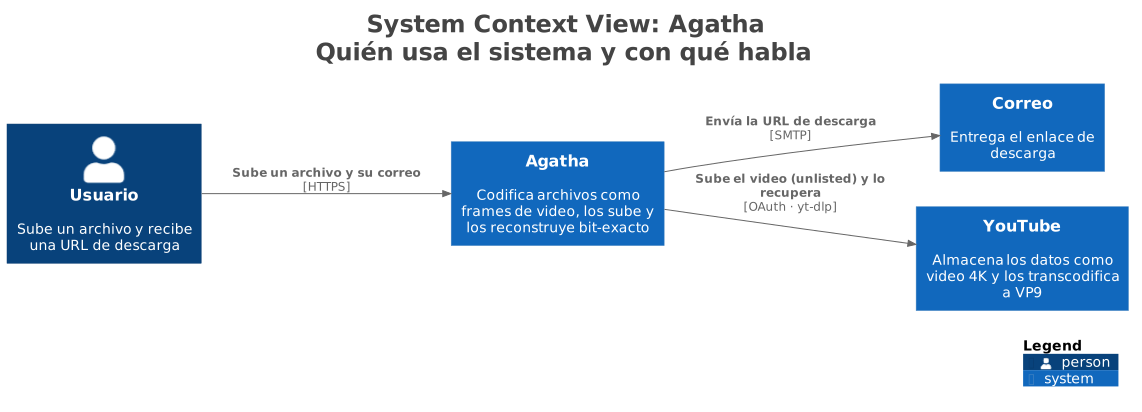
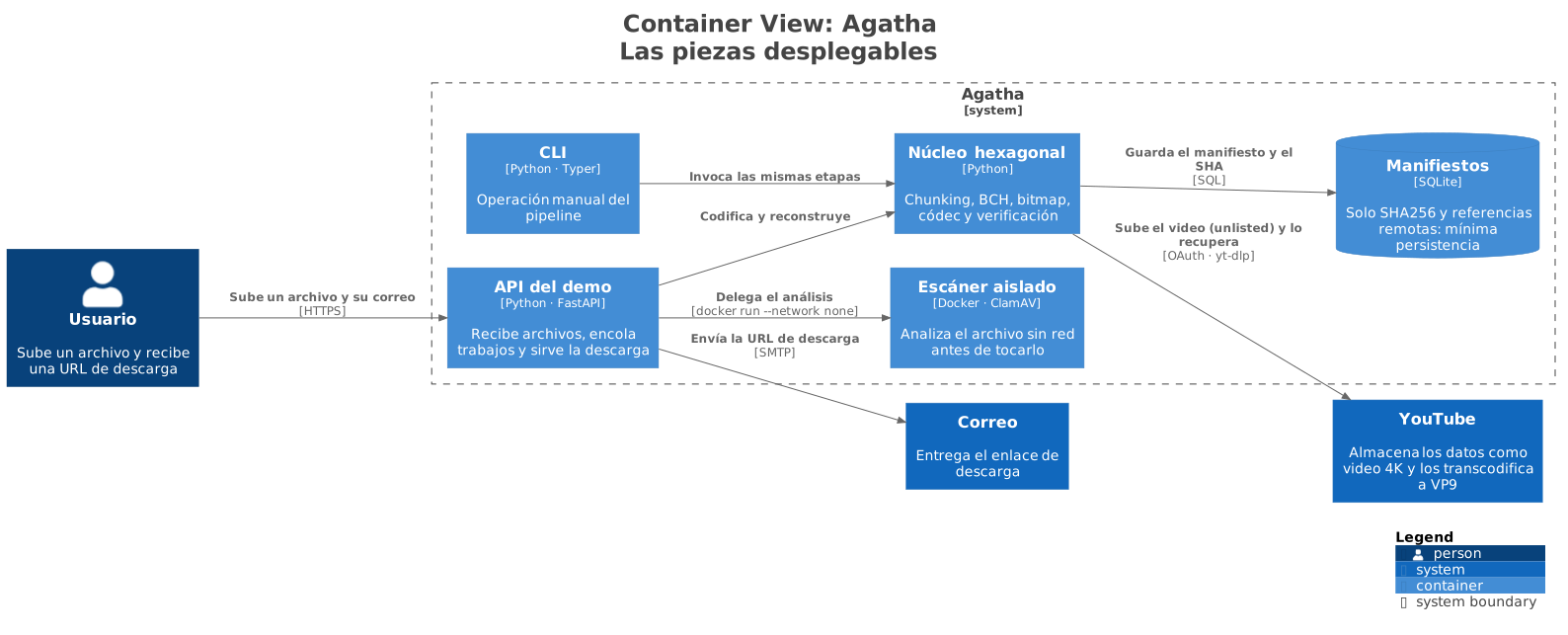
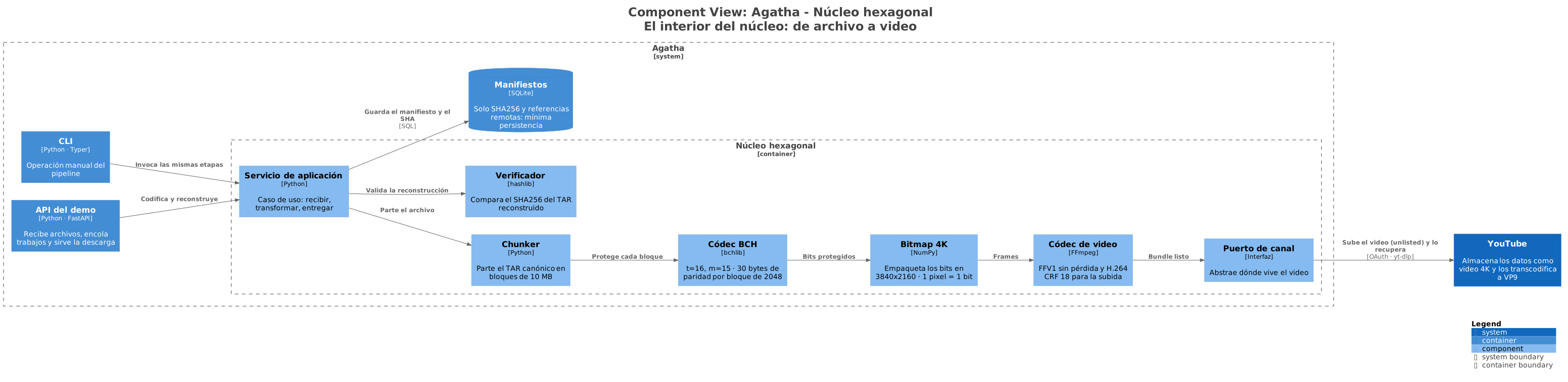
The core container is declared once, with its components inside. The context view hides it, the container view draws it as a closed box and the component view opens it. If tomorrow I rename the BCH codec, it changes in all three at once. And if I write a relationship to an element that does not exist, validate catches it before the commit.
The full file is here: workspace.dsl.
Path 2: C4-PlantUML
C4-PlantUML is a macro library on top of PlantUML, not an application you install. The model is written as text and rendered against any PlantUML server.
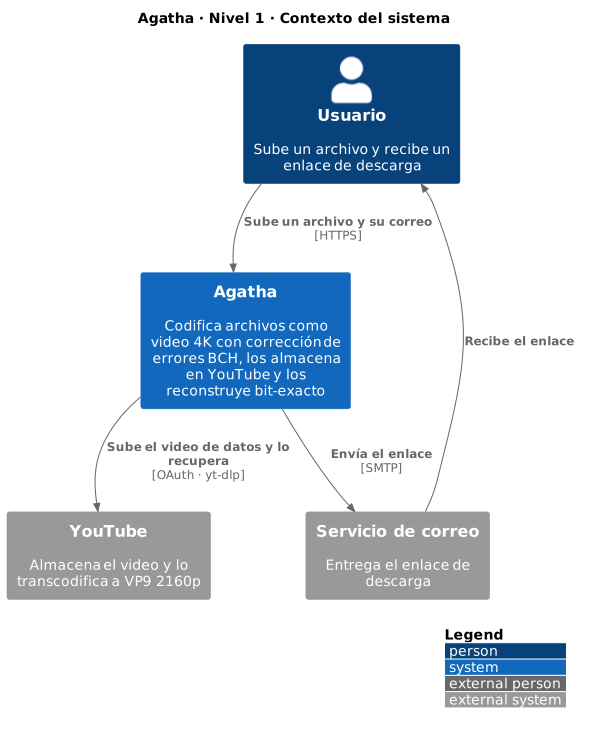
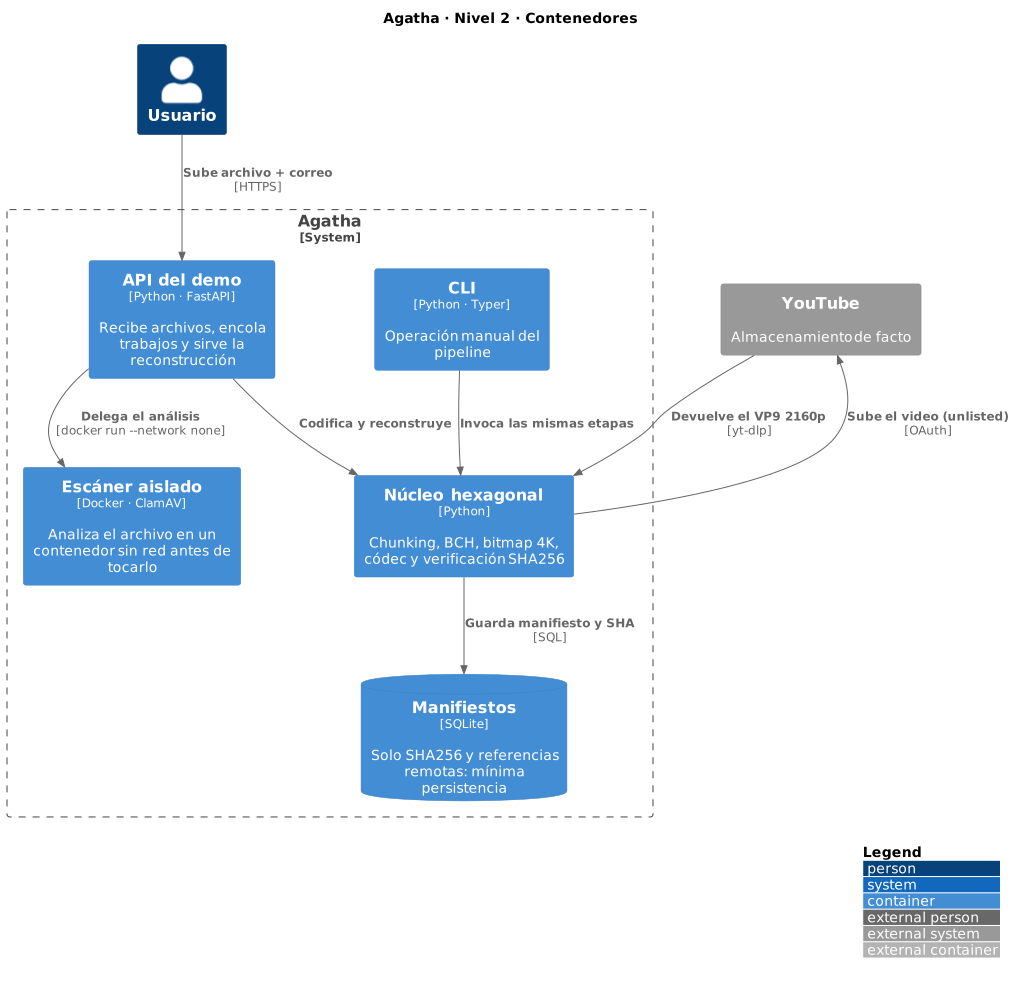
I wrote the same three levels of Agatha, this time as three separate files, and rendered them against a public server. All three SVGs came out in seconds and I installed nothing. The cost shows up later, and not in performance.
Level 1 · Context
Who uses the system and what it talks to. No internal detail.
Level 2 · Containers
The deployable pieces and how they communicate.
Level 3 · Components
The inside of the core: the path a file takes to become video.
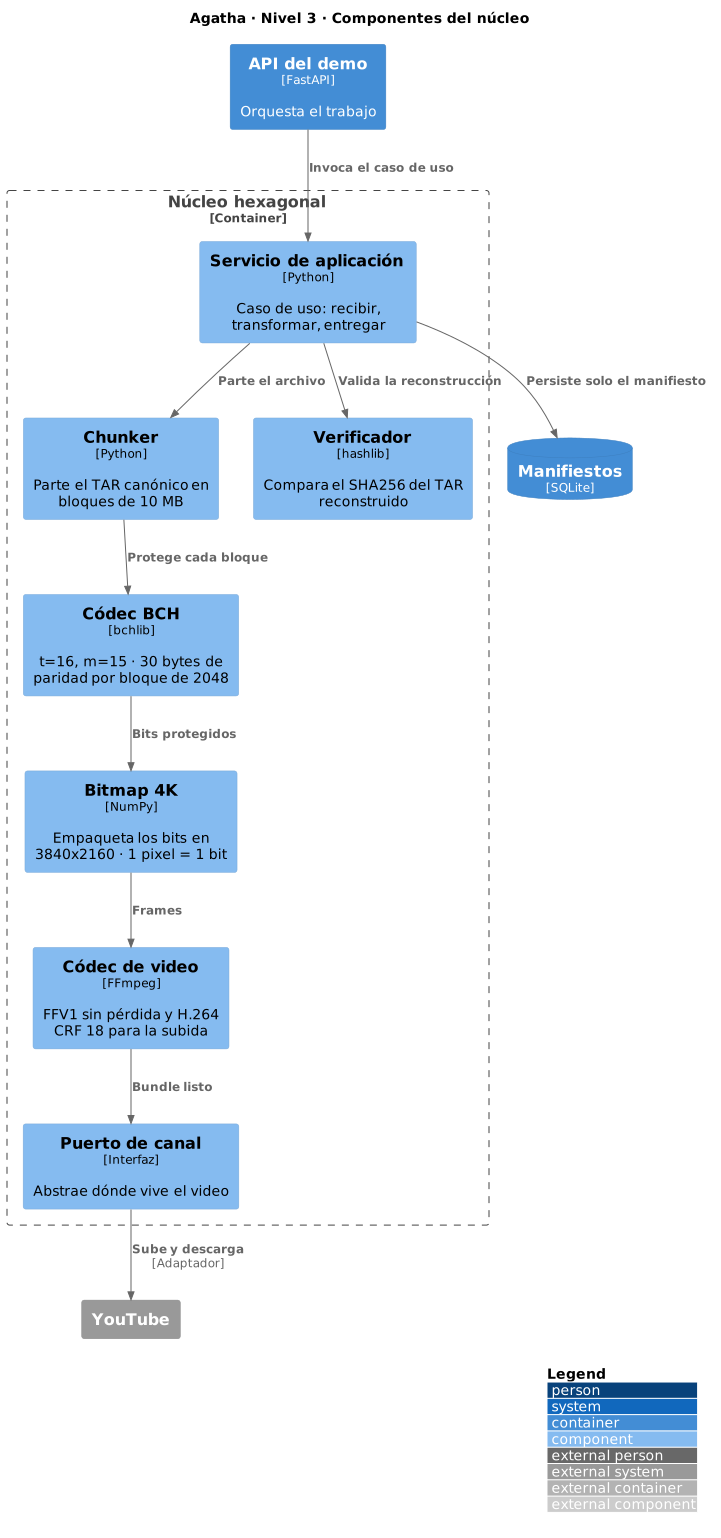
The three files add up to 68 lines (context, containers, components). The Structurizr DSL that produced the three views above is 66. Practically the same text, and that is the point: you do not pay in lines, you pay in duplication. The BCH codec component is written once in the DSL and twice across these files, with its description copied by hand. The third time someone renames it in only one file, the diagrams start contradicting each other.
The four gates this unlocks
These four do not depend on which tool you pick, but on the model being versioned text.
1. Authoring. The model lives next to the code. It is edited in the same editor, on the same branch, in the same commit as the change that motivated it. There is no other application to open and nothing to remember afterwards.
2. Review. This is the big one. An architecture change looks like this in a pull request:
-    api -> postgres "queries"
+    api -> cache "queries"
+    cache -> postgres "on miss"
Three lines. Anyone on the team understands what changed, who did it and when, and can approve or reject it before it exists in the code. A PNG does not admit that conversation; it only gets accepted.
3. Validation. If the model does not parse, the build fails. Documentation stops being something that can rot silently and becomes something that breaks loudly, which is exactly what you want.
4. A single source of truth. This is the only gate where the two tools do not tie. Structurizr’s three diagrams come out of the same file, so renaming a container updates it in every view. With C4-PlantUML that is three manual edits, and one lapse is enough for level 3 to say something level 2 no longer says.
My take
Structurizr has the better conceptual model, and it is also the serious path for a company: you define the system once, the views derive themselves and validate warns you if a relationship points at something that does not exist. Using the CLI instead of the web server, the cost disappears: one second to export everything. What does grate is that the best-documented variant is discontinued and that the Docker images weigh nearly a gigabyte for what a JAR solves.
C4-PlantUML has no unified model. Each diagram is a file and you hold the levels consistent yourself, by hand. In exchange it works immediately, renders in seconds against a public server, and the result looks exactly the way the C4 standard says it should.
Conclusion: for a personal project, C4-PlantUML and be done. For a company, Structurizr with the CLI: a single model with automatic validation is precisely what stops documentation from contradicting itself once ten people are touching it. What I would not do in either case is stand up the web server just to generate images.
And about the visual editor that started all this: it may well be excellent, but it cannot be self-hosted or versioned, and that leaves it outside the one property that makes architecture as code useful.
When I would use it
- In any repository with more than two services: the container level pays for itself.
- When new people join the team. A diagram generated from the repository is a diagram you can trust.
- I would not use it for a polished presentation to management. A visual tool wins there.
The trigger: How I stopped splitting architecture across ten documents (Habr, in Russian).
Comments
No comments yet. The first one is yours.