
Why I moved my whole home lab to NixOS: four machines, one repository and what it cost
I had four machines with four different operating systems, services running in tmux, passwords inside unit files and several agent sessions touching everything at once. In nine days I moved them to NixOS with a single flake. I measured what it gives: a deploy takes 11 to 17 seconds, the same commit produces the same system hash on two different machines, and going back to the previous version takes 1.6 seconds. And I measured what it cost: 35 of 111 commits are fixes, every Python environment was lost and the router's DNS repointed 1,185 files on its own.
Until October 6 I had four machines at home and four operating systems: a laptop with Windows 11, a server with Kali, a tower with Fedora 43 and another laptop with Ubuntu. Each had been set up by hand, at different times. The stream ran in four tmux sessions, a database password lived inside a systemd service file, ComfyUI used the system python with packages installed by hand, and rebooting the server meant being at the keyboard to unlock the disk.
That holds while one person touches the machines. It stopped holding when I started working with several agent sessions in parallel: one building reels, another running models, another on the blog’s benchmarks. Each installed whatever it needed wherever it needed it. After a while nobody, me included, knew for sure what was on each machine or why.
So between October 6 and 14 I moved everything to NixOS. Today the four machines come out of the same repository. This post is about why, how, what I measured and what it cost, which was not little.
■ declared in the flake ·■ outside it ·■ down · last line of each card: generation, system closure, services running
What changes with NixOS
On a regular distribution, the system is the result of everything that was done to it: every apt install, every file edited in /etc, every service started by hand. If I want to know how a machine is, I have to look at it.
NixOS works the other way around. The whole system is described in files: which packages there are, which services run and with what options, which users exist, how the disk is partitioned. nixos-rebuild switch builds that system and activates it. If something is not written down, it does not exist, and whatever I installed by hand on the system disappears on the next change.
A flake is the way to pin all of that in a repository: the exact version of the packages (in my case, nixpkgs pinned to 26.05.11275), my own modules and each machine’s configuration. Mine is called nix-zerg and has 2,447 lines of Nix in 23 modules.
For working with agents, this changes the rules. No session installs anything by hand. When one needs something on a machine, it adds it to the flake, commits and deploys. If it gets it wrong, the mistake stays in the git history, with its diff, and can be reverted.
- Operating system4 different ones: Windows 11, Kali, Fedora 43 and UbuntuNixOS 26.05 on all 4, the same pinned nixpkgs
- Servicesthe stream in 4 tmux sessions; a pre-copy died when logind closed the sessiondeclared systemd units, restarted automatically
- Secretspasswords inside the units and 10 plaintext secrets on one disk10 secrets encrypted with agenix to each machine's key
- PythonComfyUI on the system python with global pipone environment per app with its exact lock in the repo
- Rebootingvworker needed its disk unlocked by hand at the consoleit boots on its own; if something fails, the previous generation is picked
- Knowing what runshand-made inventories before touching anythingthe deployed commit is on every machine and the panel flags any that differs
How the migration went
■ feat 52■ fix 35■ docs 14■ refactor 5■ chore 4■ perf 1
lenovo came first, on October 6: Windows out and NixOS installed from a channel, the old way. The next day I imported it into the flake, and the system built from the repository came out identical to the one already running.
vworker, the Kali server, was different. Instead of a USB stick I used nixos-anywhere: it boots an installer over kexec on top of the running system, partitions the disk with disko and installs. It took 7 minutes, from 20:44 to 20:51 on October 7. I had copied what mattered to the lenovo beforehand, and the machine came back with the same SSH key and the same address on the internal network, so the encrypted secrets worked on the first boot.
fedora was the machine with the most on it: the main GPU, the models, a test environment for a client and 38 Python environments. I wiped it completely on October 12. Before touching the disk I checked the backup against the original: 1,407,986 files without a single difference. The core was down for 5 hours and 50 minutes, within what I had estimated.
huawei, the last one, went in on October 14 with a custom installer that connects over Wi-Fi. The first two times it hung and had to be switched off and on by hand.
A deploy is a commit
Deploys are done by a short script, nz-deploy. It refuses to run if there are uncommitted changes or if the commit is not on GitHub, so everything running on a machine exists in the repository. Then it ships the code over ssh, records which commit it is and runs nixos-rebuild switch.
- 1clean tree and pushed?
- 2git archive HEAD
- 3ssh to the machine
- 4writes REVISION
- 5nixos-rebuild switch
- 6failed units?
■ median · ● each run · | opening ssh alone
With the commit already deployed, each deploy took between 10.4 and 28.1 seconds. The medians of five runs were 11.2 seconds on fedora, 14.2 on lenovo and 17.3 on vworker. The first round was the slowest on all three machines, and from the third round on the times were even. Opening the ssh connection alone has a median under half a second; subtracting it, the medians become 10.9, 13.8 and 17.0 seconds. I did not separate how much of that is evaluating the configuration and how much is activating the system.
An honest note: the flake declares deploy-rs, which has a magic rollback: if a machine stops answering over SSH after a change, it goes back to the previous version on its own. But nz-deploy does not use it: it calls nixos-rebuild switch directly. Today, if a change breaks a machine’s network, going back is manual.
The same commit, the same system
The promise of NixOS is that the same configuration produces the same system. I tested it by evaluating the same commit on two different machines, vworker and fedora, and comparing the hash of the whole system of each of the four hosts.
5z6dgqgzi96z…5z6dgqgzi96z…6kx7a4s4m852…6kx7a4s4m852…r225ybk6xsmd…r225ybk6xsmd…8mx43jjd6h8j…8mx43jjd6h8j…The four hashes came out the same on both machines, character by character. It is the hash of the evaluated system, the one Nix would build; I did not rebuild the systems to compare the binaries bit by bit. To know the hash really depends on the configuration I ran two controls. Adding a comment to a module changed nothing, because comments are not part of what gets built. Adding one line with effect to vworker’s file changed vworker’s hash and nobody else’s.
The test I cared most about is the last row: the hash of what is running right now on each machine is the same one you get evaluating the commit from git. On the first try it did not match, and I was worried until I understood why: the deploy writes the commit number into the system, so the dashboard can show it. Evaluating with that same value, all three match.
Going back in 1.6 seconds
Every nixos-rebuild switch leaves a numbered generation, and the earlier ones are not deleted: they stay on disk and in the boot menu. vworker is on generation 31, and it has not rebooted once in the 7 days since I installed it.
■ current generation · ■ previous, still bootable · 3 of 3 round trips, 0 failed units
I measured going back on lenovo, the machine with the least at stake: switching the running system to the previous generation and back to the current one, three times. Going back took a median of 1.59 seconds and coming forward 1.60. In all three, everything ended as it was and no unit was left failed. That is the safety net I did not have with Kali or Fedora: if a change goes wrong, the previous version is one command away.
↶ 1.59 s · ↷ 1.60 s · 3/3 rounds, 0 failed units
What it cost
This part matters to me more than the previous ones, because most writing about NixOS leaves it out.
of the commits are fixes
- ●●● data or results at riskThe router's DNS returns malformed answers: rclone saw the Drive empty and 1,185 links were repointed on their own
- ●●● data or results at riskPython environments do not travel: 38 on fedora and about 65 GB on vworker to rebuild
- ●●○ hours lostAbout 450 GB of GPU models to download again on fedora
- ●●○ hours lost/mnt/ai-fast became /data with no compatibility link: about 379 files with the old path on the Mac alone
- ●●○ hours lostThe site's forecast repeated the October 12 analysis in the runs of the 13th and 14th, without a single error
- ●●○ hours lostlenovo cut out for 18 h 52 min, with no shutdown sequence
- ●●○ hours losthuawei stopped answering during a power sweep and has to be checked by hand
- ●○○ frictionThere is no /bin/bash and no python on the PATH
35 of the flake’s 111 commits are fixes, and 12 of them are from the first day. Each one is something that did not work the way I expected.
The worst incident was not NixOS’s but the router’s. Its DNS returns malformed answers, and rclone’s resolver read them as an empty Drive. A nightly job, which repoints the library’s files when a copy disappears, repointed 1,185 of them at once. It had to be reverted, and a public DNS pinned on every machine.
What was not declared was lost, and that is what took the most work. Python environments are not copied: 38 on fedora and about 65 GB on vworker had to be rebuilt from package lists. About 450 GB of models had to be downloaded again. fedora’s data folder changed path, from /mnt/ai-fast to /data, and on my Mac alone about 379 files were left pointing at the old one.
I found one case while writing this post. The weather forecast the site publishes repeated the October 12 analysis in the runs of the 13th and the 14th, without a single error. The model’s Python environment did not exist and the script failed. But the next step read the last forecast on disk, which was the old one. I rebuilt it, and now a failure in that step is a visible error.
And the everyday stuff: NixOS has no /bin/bash, and python is not on the PATH unless it is declared. Scripts with #!/bin/bash stopped running until they were changed to #!/usr/bin/env bash.
There were two outages whose cause I did not confirm. lenovo cut out on October 13 at 23:23 and did not come back until 18:16 the next day: 18 hours and 52 minutes without a single log line, and the system’s last message is a normal session close, with no shutdown sequence. And huawei stopped answering today during a power test, and someone has to go check it by hand.
The app that sees everything
With four machines declared, I still needed to see what was happening without logging into each one. So the flake has a module of its own, zerg-status: a Python collector, with no dependencies, that runs on every machine and serves a dashboard made for the tablet. It shows load, memory, disks, GPU, which process uses the GPU and which service it belongs to, the GPU locks, every service and every container, and which commit is deployed. If a machine runs another commit, or changed its kernel and needs a reboot, the dashboard flags it.
Since the module is in the flake, adding a machine to the dashboard is one line. The VPS, which is not NixOS yet, runs the same collector by hand and listens only on the internal network.
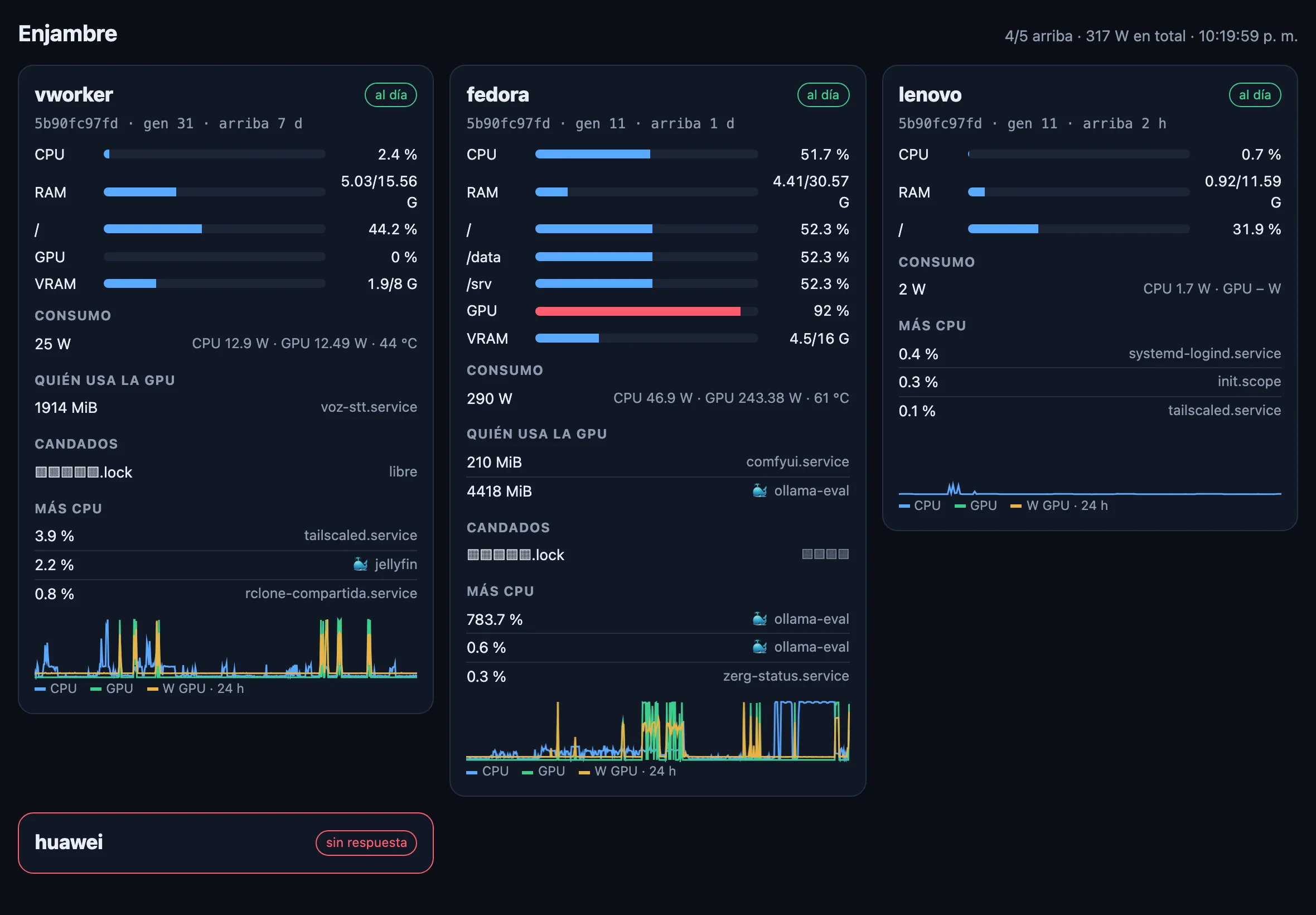
The real dashboard. I hid the service and container lists, the lock names, the sessions and the VPS card, because they name client and third-party projects.
The dashboard also stores each machine’s power draw, and that is where this chart comes from:
fedora, with the RTX 4070 Ti SUPER, has a median of 52.6 W and a 95th percentile of 219.4 W when the GPU works; the maximum was 321.6 W. vworker sits at 25.6 W and lenovo at 1.4 W. These are windows of a few hours, what the dashboard had stored at the time of the measurement, not a full day.
When I would recommend it and when not
I would recommend it if you have more than one machine, if several people or agents touch the same systems, or if you have already lost track of what got installed where. Knowing which commit runs on each machine, being able to go back in seconds and having every change in git is what, in my experience this week, made the swarm easier to maintain. I did not measure it: it is my judgement, not a number.
I would not recommend it if you have a single machine that already works and you do not plan to touch it, or if you depend on software that needs fixed paths like /usr/lib and have no time to fight with that. nix-ld solves a good part of it, but not all. And do not expect the migration to be clean: a third of my commits were fixes.
What this measurement does not cover
- There is no measured “before”. The old machines never had metrics, so I cannot say how much faster or more stable this is; only what it measures today.
- A single swarm, four machines that differ from each other. None of this generalizes to other setups.
- huawei was off during the measurements and is not in the times or the power.
- Deploy times depend on the network and on each machine’s load at that moment.
- Power covers a few hours per machine (under one on lenovo), not a full day.
Measured on October 14, 2026 on four machines running NixOS 26.05 (nixpkgs 26.05.11275), flake nix-zerg at commit 5b90fc9: vworker (i5-9400F, RTX 2060 SUPER), fedora (Ryzen 7 7800X3D, RTX 4070 Ti SUPER), lenovo (i5-8250U) and huawei (Ryzen 5 3500U, off during the measurements).
Sources
- NixOS manual: rolling back configuration changes. How generations and rollback work.
- Nix manual: flakes. What a flake is and how it pins its inputs.
- nixos-anywhere. Installing NixOS over SSH on a machine running another system.
- disko. Declarative partitioning.
- agenix. Secrets encrypted to each machine’s SSH key.
- nix-ld. Running binaries that expect a regular distribution’s paths.
- deploy-rs. Deploys with automatic rollback (declared in the flake, not used by
nz-deploy). - My scripts, the measurement sheet and the raw data. The deploy, evaluation, rollback and power measurements, with the sheet written before measuring.
- NVIDIA Container Toolkit: CDI. How the GPU is passed to Docker.
Frequently asked questions
Why NixOS and not Ansible or Docker on Ubuntu?
Because in NixOS the whole system comes out of the configuration: packages, services, users, disks and secrets. With Ansible on Ubuntu the real state can drift from what is written as soon as someone installs something by hand, and Docker solves the applications but not the system that runs them. In my case, with several agent sessions working on the same machines, I needed the only valid state to be the one in the repository.
How long does a deploy take?
With the commit already deployed, the median of five runs was 11.2 seconds on fedora, 14.2 on lenovo and 17.3 on vworker, end to end: checking the tree is clean, shipping the code over ssh, nixos-rebuild switch and looking for failed units. The first round was slower, between 17.7 and 28.1 seconds.
How fast can you go back if something breaks?
On lenovo, switching the running system to the previous generation took a median of 1.59 seconds, and coming back to the current one another 1.60, over three round trips with no failed unit. If the machine does not boot, the boot menu keeps up to ten generations.
What do you lose when migrating?
Everything that was not declared. In my case, the Python environments (38 on fedora and about 65 GB on vworker), about 450 GB of models that had to be downloaded again, paths that changed and old services I chose not to port. Also, /bin/bash does not exist and python is not on the PATH, so several scripts had to be fixed.
Is it worth it with a single machine?
Yes, but the gain is smaller. What mattered most in my case was having four machines described in one place, knowing which commit runs on each and letting an agent session integrate something new with a commit and a deploy. With one machine you still get rollback and a reproducible configuration, which is already a lot.
How is everything monitored?
With a module of the flake that runs on every machine and serves a dashboard for the tablet: load, memory, GPU, who uses the GPU, power in watts, services, containers and which commit is deployed. If a machine runs another commit or needs a reboot, the dashboard flags it.
NEWSLETTER · MEASURED
A new measurement, when there is one.
Each post with its numbers, its failures and the scripts to repeat it. One to three emails a month. Unsubscribe with one click.
LATEST
- NVFP4 vs FP8 vs GGUF on 16 GB2.3× faster
- Qwen-Image NVFP4 on Ada19/21 less grain
- Kandinsky 6 on 16 GBWER 0.15 in Spanish
I run Listmonk on my own server; your address stays there. You confirm by email before getting anything.
Comments
No comments yet. The first one is yours.